On GroupSpot, your group’s home screen has three distinct views: Standard View, Upcoming View, and Featured Posts. Owners can choose between Standard View and Upcoming View as their primary default view depending on their group type. Let’s review the difference between the two views:
Standard View provides full admin-control over this view, including admin-curated content for the group, featuring standard posts, events, and game posts for teams. When you swipe left to the middle column, you will find a forward looking truncated upcoming view of events and games. If you swipe once more, you will find your pinned posts.
Upcoming View provides an alternate default view that consists of forward looking calendar events only (as well as games for teams). This is especially popular in youth sports where the most important information is the next game or practice. When you swipe left to the middle column, you will find all your standard posts. If you swipe once more, you will find your featured posts.
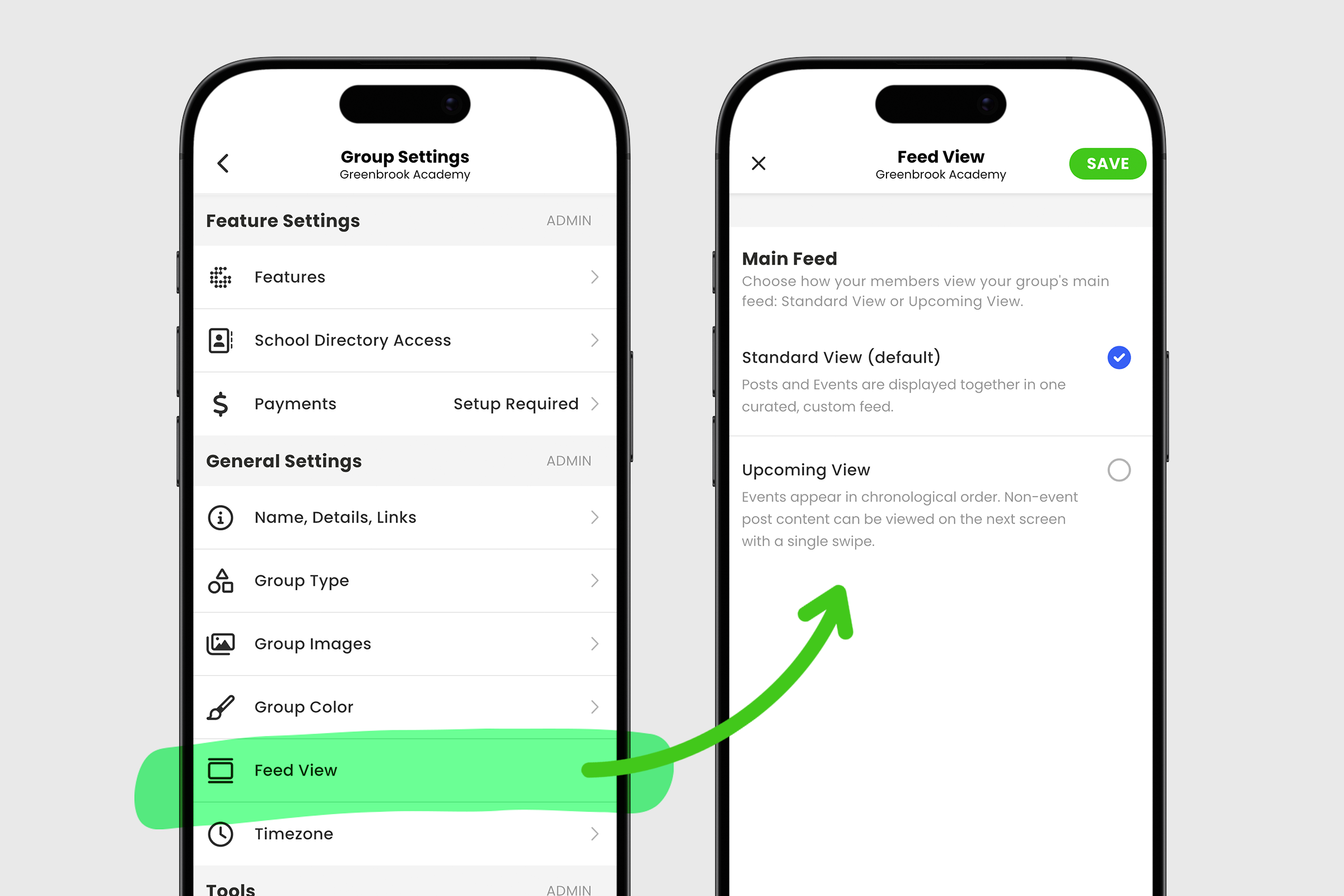
For most groups looking to optimize their experience, taking advantage of the full suite of tools offered, GroupSpot recommends the default Standard View. However, if you only need a forward looking calendar, you’re better off switching to Upcoming View. Here’s how to access these choices:
1. Open your group menu and choose Group Settings.
2. Under General Settings, choose Feed View.'
3. To change your default view from Standard View to Upcoming View, select the new view and remember to SAVE.
4. Once saved, leave the group and reenter the group so your changes are reflected.
5. If you change your mind, it’s easy to return to this screen and switch back to Standard View.